
TL;DR
- I run a small software agency whose team is made of AI agents: a Product Manager, a Tech Lead, a Developer and a QA Engineer. They all work on one desktop computer, an NVIDIA DGX Spark.
- A human (me, the owner) writes the brief and reviews and merges every pull request. The agents never merge anything. That isn't a weakness of the system. It's the part that makes the rest trustworthy.
- The agents work from tickets on a self-hosted board called Paperclip. Code goes to GitHub through pull requests with automatic checks. A small no-AI script called Autopilot does the routine ticket moves after each merge.
- Each role gets the model that fits the job. Planning runs on a free local model (Qwen 3.6 35B on the Spark). Design and code run on a stronger cloud model. QA runs on the cheapest cloud model.
- In one real run, the team went from an empty repository to a finished, tested app in about 2 hours, in 7 human-reviewed pull requests, for under one US dollar of paid AI usage at API prices. When QA found failing tests, it sent the work back and the developer fixed it without me stepping in.
- Below: the architecture, the roles, the ticket flow, the GitHub guardrails, the rules every agent follows, that run minute by minute, what it cost, and the mistakes that shaped the design.
1. The idea: a software team, not a chatbot
Most "AI builds an app" demos are one long conversation with one model. That works for a prototype. It falls apart when you want something you'd hand to a client: there's no spec, no review, no tests anyone checked, and no record of why a decision was made.
So I copied the shape of a small human software team instead:
- A Product Manager turns a brief into requirements and user stories.
- A Tech Lead designs the app and splits the work into tickets.
- A Developer builds one story at a time, tests first, each as its own pull request.
- A QA Engineer tests the finished app like a real user and is allowed to say no.
- An owner (a human) approves every change before it goes in.
Every hand-off leaves something you can read: a PRD, an architecture document, decision records, a pull request with a green check, a QA report. If something goes wrong, you can see exactly where.
2. The big picture
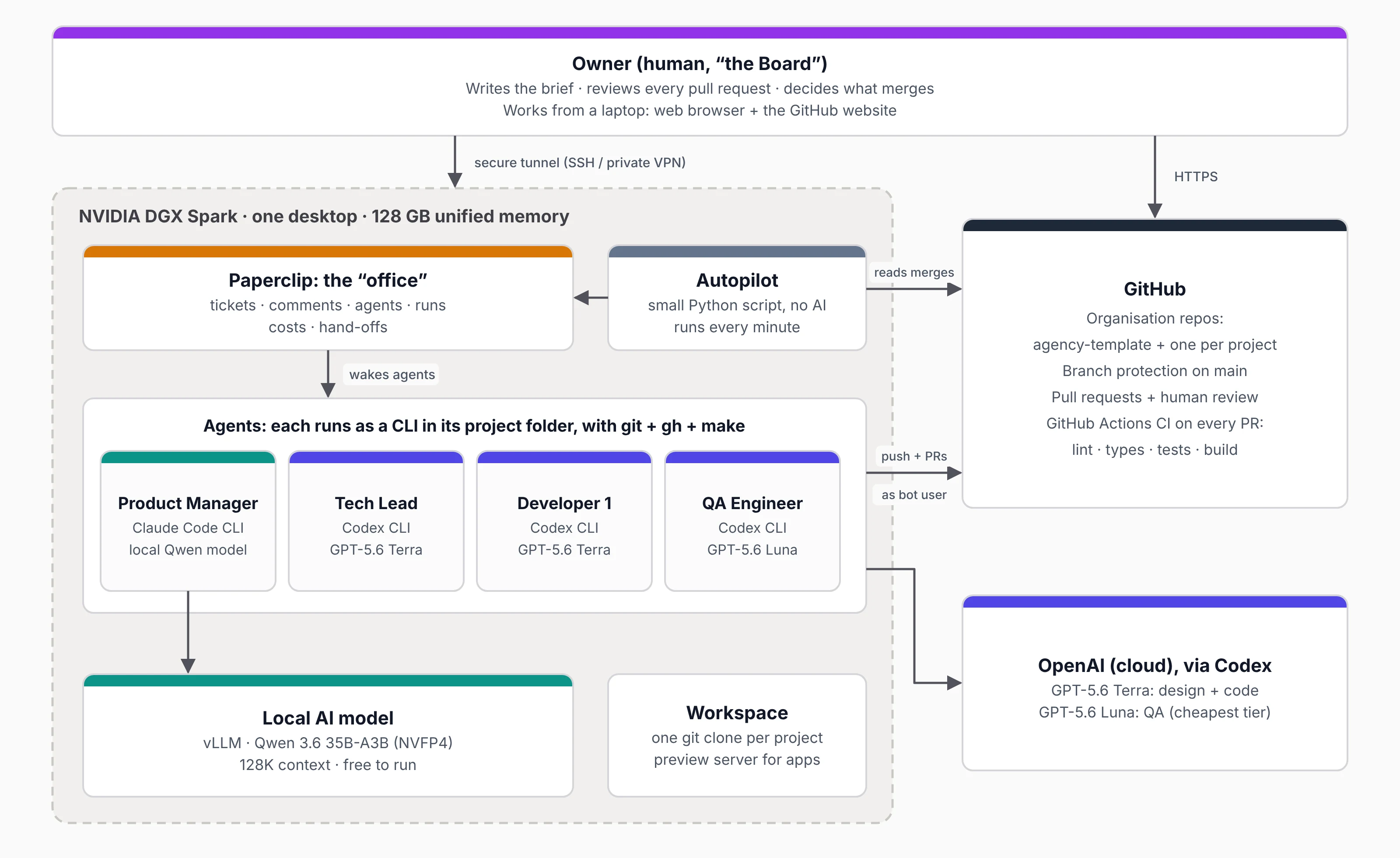
In plain words:
- Paperclip is the office. It holds the tickets and wakes the right agent.
- Each agent is a command-line AI coding tool working inside the project's folder. It can read files, write code, run tests and use git.
- The Product Manager talks to a free local model on the Spark. The other agents use OpenAI models through the Codex CLI.
- All code goes to GitHub through pull requests. GitHub runs the checks, and only the owner can merge.
- Autopilot watches GitHub and Paperclip and does the boring ticket moves, without AI.
I reach all of it from a laptop through a secure tunnel: Paperclip in the browser, pull requests on the GitHub website.
3. The machine: one desktop, one local model
| Item | Value |
|---|---|
| Machine | NVIDIA DGX Spark (desktop "AI supercomputer") |
| Chip | NVIDIA GB10 Grace Blackwell superchip |
| CPU | 20 Arm cores (aarch64) |
| Memory | 128 GB unified memory, shared by CPU and GPU |
| OS | Ubuntu 24.04 (NVIDIA DGX OS) |
| Share for the local model | 60% of GPU memory reserved for it |
One quiet desktop runs the whole office: the ticket system, the agents' workspaces, the test browsers and a 35-billion-parameter AI model. Three things make that worthwhile:
- The local model costs nothing per use, only electricity. That matters more than you'd think, because the planning step reads a lot (section 11).
- Planning text stays in-house. The local model never sends it to a cloud.
- It's fast enough. The model is Qwen 3.6 35B-A3B in NVIDIA's compressed 4-bit NVFP4 format. It's a mixture-of-experts model: 35 billion parameters in total, but only about 3 billion are active for each token, so it runs quickly on a desktop. It's served by vLLM with a 128K context window.
4. The stack
| Layer | Tool | What it does |
|---|---|---|
| Agent office | Paperclip (self-hosted, login required) | Tickets, comments, agents, run history, cost tracking |
| Local AI server | vLLM 0.28.0, in a container | Serves the local model with OpenAI- and Anthropic-style APIs |
| Local AI model | Qwen 3.6 35B-A3B (NVFP4) | The Product Manager's brain |
| Cloud AI models | OpenAI GPT-5.6 Terra (medium reasoning) | The Tech Lead's and Developer's brain |
| OpenAI GPT-5.6 Luna (medium reasoning, cheapest tier) | The QA Engineer's brain | |
| Agent runtimes | Claude Code CLI, pointed at the local vLLM server | Runs the Product Manager |
| OpenAI Codex CLI | Runs the Tech Lead, Developer and QA | |
| Planning method | BMAD Method skills (bmad-prd, bmad-architecture, bmad-qa-generate-e2e-tests) |
Structured steps for PRDs, architecture and test writing |
| Code hosting and checks | GitHub + GitHub Actions | Repos, pull requests, reviews; make setup and make check on every PR |
| Command line | git, gh (GitHub CLI), make | How agents branch, commit, push and open PRs |
| Project template | agency-template repo | Makefile, CI, rules, PR template, git hook |
| Helper | Autopilot | About 300 lines of Python on a one-minute systemd timer; no AI |
One detail worth copying: Claude Code is a cloud-model tool by default, but vLLM speaks an Anthropic-style API, so you can point Claude Code at your own machine and get a capable agent runtime on a free local model.
5. The team: the right model for each job
| Role | Model (where it runs) | Main job | Never does |
|---|---|---|---|
| Owner (human) | - | Writes the brief, reviews and merges PRs, answers open questions | - |
| Product Manager | Qwen 3.6 35B, local, free | Brief → PRD + 2–4 stories with Given/When/Then and test notes → [SPEC] PR |
Write code, create build tickets |
| Tech Lead | GPT-5.6 Terra (cloud) | PRD → architecture + decision records + chained [BUILD] tickets + a [QA] ticket → [ARCH] PR |
Write feature code, merge |
| Developer 1 | GPT-5.6 Terra (cloud) | One story at a time: tests first, code, checks, PR; fixes QA failures | Merge, push to main, add unapproved dependencies, edit CI files |
| QA Engineer | GPT-5.6 Luna (cloud, cheapest) | Tests the finished app in a real browser at phone and laptop sizes; writes a PASS/FAIL report | Commit code, create tickets |
| Autopilot | Script, no AI | After the owner merges: closes tickets, opens the next step, starts stuck tickets once, closes the project | Approve or merge anything |
The rule I use to pick models is simple:
- Planning reads a lot and writes text, so the free local model does it.
- Design and code need the strongest reasoning, so they get the stronger paid model.
- QA follows a strict checklist, so the cheapest paid model is enough.
There are four more agents in the system that I keep paused: a CEO agent, a second developer, a tech writer and a DevOps/release agent. More agents cost more and, for a project of four stories, add nothing. One developer is enough, and I act as the CEO.
6. The office: tickets, states and hand-offs
Everything the agents do starts and ends on a ticket. The title prefix says what kind of work it is:
| Prefix | Created by | Assigned to | Delivers |
|---|---|---|---|
[GOAL] |
Owner | Owner | The project itself; closed by Autopilot at the end |
[SPEC] |
Owner | Product Manager | PRD + stories as a PR |
[ARCH] |
Autopilot, after the spec merges | Tech Lead | Architecture + decision records as a PR, plus the build tickets |
[BUILD] STORY-00N |
Tech Lead | Developer 1 | One story as one PR |
[QA] Final check |
Tech Lead | QA Engineer | A report: QA PASS, QA FAIL or NEEDS BOARD DECISION |
[REVIEW] (optional) |
Owner | Tech Lead | A security or architecture review for risky work: login, payments, personal data |
Tickets move through five states:
 backlog ──► todo ──► in_progress ──► in_review (owner's turn) ──► done
                ▲           │
                │           └──► blocked (waiting on another ticket or a person)
                │                     │
                └─────────────────────┘  (Autopilot starts it when the blocker is done)
Two design choices make this work without constant babysitting:
- Chaining. The build tickets are linked like train carriages. Story 2 is "blocked by" Story 1, Story 3 by Story 2, and the QA ticket by the last story. When one finishes, the next one starts on its own.
- A hand-off is just a ticket update: change the assignee and the status, and add a comment. When QA fails something, it does not open a new ticket. It hands the same ticket back to the developer, so the report, the fix and the re-test all stay on one page.
7. How an agent works: the run loop
Each time Paperclip wakes an agent, the same steps happen:
- Read the ticket summary and new comments (they come in the run prompt).
- Read
AGENTS.md(the repo's rules) anddocs/STATE.md(the project status). - Read only the files this ticket needs.
- Do the work in the project folder:
git switch main,git pull, new branch, write tests, write code, thenmake check(lint, types, unit tests, build) andmake e2e(browser tests). git push,gh pr create, thengh pr checks --watchto wait for green CI.- Prove GitHub has the exact commit that was tested: the local HEAD must equal the PR head.
- Comment on the ticket: the full PR link, what changed and what's left, in at most 5 lines.
- Hand off, either to the next agent (status "todo") or to the owner ("in review").
A run never ends with the ticket left "in progress". That one rule removes a whole class of "is anyone working on this?" confusion.
A few safety details sit around the loop:
- Each run gets its own temporary home folder and a short-lived Paperclip key.
- Agents push to GitHub as a separate bot account, never as the owner.
- A command that fails twice stops the agent. It posts the exact error and marks the ticket "blocked" instead of thrashing.
8. The delivery flow
Put the roles, tickets and run loop together and a project flows like this:
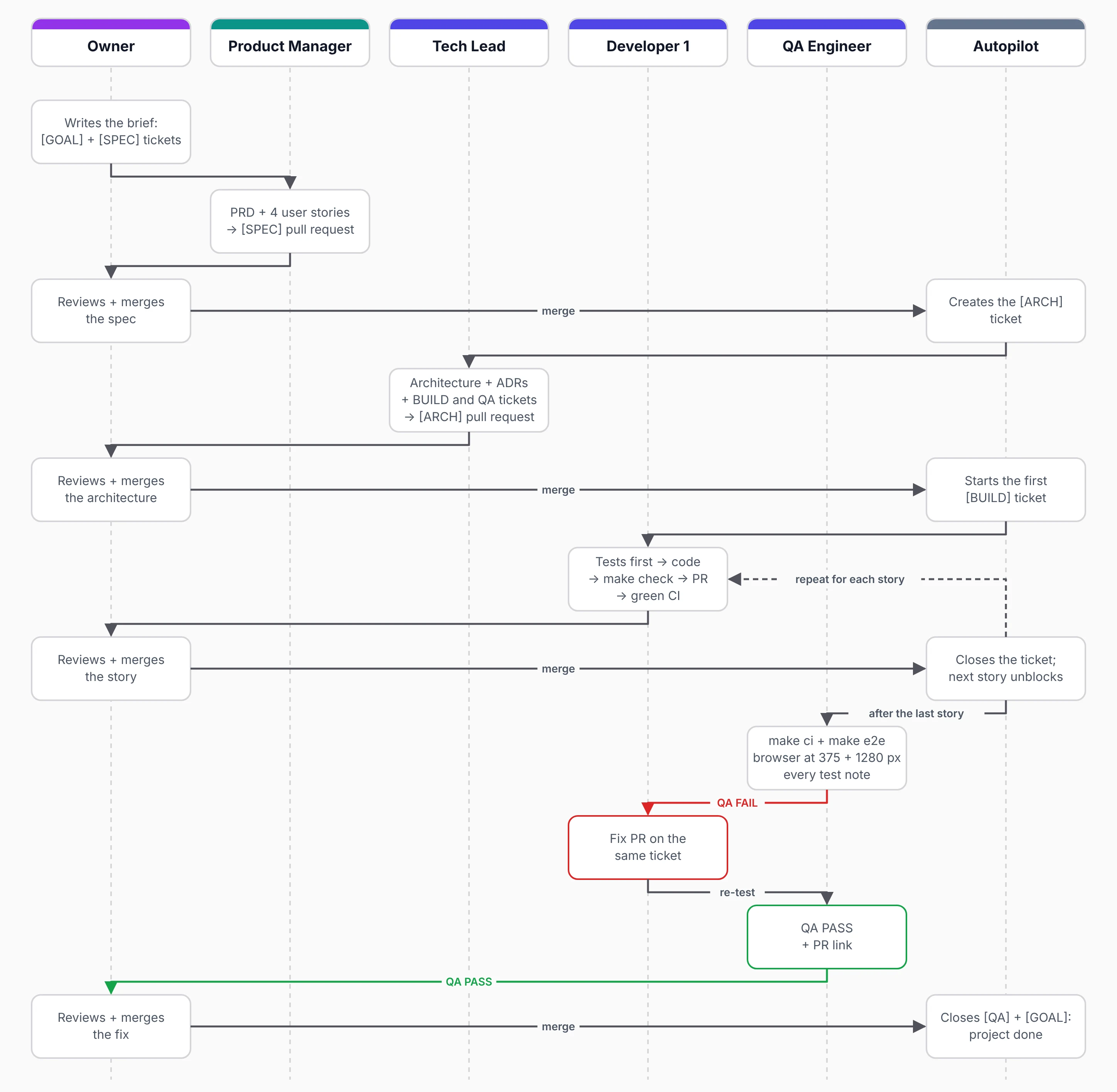
Notice where the human sits: at every merge, and nowhere else. I don't move tickets, start agents or chase status. I read pull requests and decide what goes in.
9. Autopilot: automate the clicks, not the judgment
Early on, the slowest part of the system was me. After I merged a pull request on GitHub, the next step often didn't start until I went into Paperclip and moved a ticket. So I wrote Autopilot: about 300 lines of Python that runs every minute, uses no AI and costs nothing.
| When it sees... | It does... |
|---|---|
A [SPEC] PR merged |
Marks the ticket Done and creates the [ARCH] ticket for the Tech Lead |
An [ARCH] PR merged |
Marks it Done and starts the first [BUILD] ticket |
A [BUILD] PR merged |
Marks it Done, so the next chained story unblocks |
A [QA] report that says QA PASS, with no PR still open |
Marks it Done |
All work under a [GOAL] Done |
Closes the [GOAL] |
| A blocked ticket whose blockers are all Done, still idle after 3 minutes | Starts it, once |
| A plain follow-up ticket I wrote, with its PR merged | Marks it Done |
| Any project folder | Makes sure commits use the bot's name and the GitHub login helper is set |
What it never does is approve or merge a pull request. Merging stays a human job. Every action it takes leaves an "Autopilot: ..." comment on the ticket, so the board shows what happened and why. It has a dry-run mode, and it's covered by 54 automated tests that run against fake Paperclip and GitHub servers.
The lesson generalises: use AI where judgment is needed, and plain code where the rule is mechanical. A script that moves a ticket after a merge is cheaper, faster and more predictable than an agent that "decides" to.
10. GitHub as the guardrail
Agents are only as safe as the walls around them. Mine are mostly GitHub features plus one template repository that every project starts from.
The agency-template repo
| File | Purpose |
|---|---|
Makefile |
The only commands agents use: make setup, make check, make ci, make test, make e2e, make preview, make eval |
.github/workflows/ci.yml |
On every PR and every push to main: make setup, then make check |
.githooks/pre-push |
Blocks a push if make check fails |
.github/pull_request_template.md |
Every PR states what and why, how it was tested, screenshots/logs, risk and rollback, new dependencies, and AI notes |
AGENTS.md |
The rules every agent reads first (section 11) |
docs/ |
PRD.md, ARCHITECTURE.md, stories/, adr/ and STATE.md, the living project status |
What make check runs
make check
  ├─ detect   fail if there is code but no package.json/pyproject (no untested code)
  ├─ lint     ESLint (a real linter, not only a type check)
  ├─ type     TypeScript type check (tsc --noEmit)
  ├─ test     unit + component tests (Vitest)
  └─ build    production build

make ci   = setup + check on a clean copy of the last commit
            (catches files that were never committed)
make e2e  = install Chromium + run Playwright browser tests
The make ci trick is worth stealing. Agents sometimes create a file, use it, and forget to commit it. Everything passes on their machine and fails on GitHub. Running the checks on a clean copy of the last commit catches that before the PR is opened.
Branch protection on main
- Nobody pushes straight to main. Every change arrives as a pull request.
- The CI check must be green.
- Only the owner merges.
A separate bot account
- Agents push and open PRs as a dedicated GitHub bot user, not as me.
- The bot is not allowed to change CI files. The rules forbid it, and I review every PR anyway.
- The history shows who did what: bot commits, owner merges.
11. The rules every agent follows
These rules are in every agent's instructions and in each repo's AGENTS.md. They're the most reusable part of the whole setup.
Work rules
- One ticket = one branch = one pull request.
- Never push to main. Never merge.
- Write tests first, from the story's Given/When/Then.
make cimust pass before opening a PR, and GitHub's check must be green before handing off.- Never weaken or delete a test to make it pass. Never turn off lint or type checks.
- Never edit the CI workflow files.
- A new dependency needs one line in the PR saying why. Don't add one the architecture doesn't name.
- No secrets in code, logs, tickets or PRs.
- Stuck after 2 tries: stop, post the exact error, mark the ticket blocked.
Honesty rules
- Never write that the owner approved something unless the owner wrote it.
- List assumptions and open questions instead of guessing silently.
- Before handing off, prove GitHub has the exact commit you tested.
QA rules (the strictest)
- Run
make checkandmake e2e, and paste the last lines of the e2e result as proof. - Test in a real browser at 375 px (phone) and 1280 px (laptop). Nothing may scroll sideways, and every button must be visible and clickable.
- Try empty, wrong and very long input. Clear a filled field. Leave a page with a bad value. Reopen a saved item and change it.
- Test every "Test notes" line in every story. A line you did not try is a FAIL, never a PASS.
- Start the report with QA PASS, QA FAIL or NEEDS BOARD DECISION. For each FAIL, give the exact steps to reproduce and the change needed.
- On a FAIL, hand the same ticket back to the developer.
Hand-off rules
- Each hand-off comment has at most 5 lines: the full PR link, what changed and what's left.
- A run never ends with the ticket still "in progress".
12. The input that matters most: the brief
The team needs surprisingly little input, about one page. What it needs is specific input. My briefs always have the same sections:
Goal (one sentence):
Who it's for:
What it must do, in order:        numbered features, with exact fields and limits
Main call to action:
Look and feel:                    real colours, font, money and date formats
Exact content:                    titles and fixed text
Out of scope:
Tech wishes:
Done when (things QA can test):
The "Done when" list is the most important part, because it becomes QA's checklist. Here's the one from the run below, for a private sales-lead tracker:
Done when (things QA can test):
- Every screen works at 375px and 1280px with no sideways scrolling.
- An invalid value (empty name, wrong email, value above 10,000,000 or with
  3 decimals) blocks Save and shows a clear message.
- Leaving a form with unsaved changes asks before throwing them away.
- Leads, stages and notes survive a page reload.
- The dashboard totals match the leads exactly (5+ leads across all stages).
- A follow-up date of today shows in "Follow up today" at 1 AM local time.
- The CSV opens in a spreadsheet with one row per lead and correct AED values.
- Very long names and notes (500+ characters) do not break any layout.
Every line is something a tester can check. Vague briefs create vague software, and every vague line can turn into a QA failure and an extra fix round.
13. A real run, minute by minute
To show the system working end to end, here's one complete run from 9 November 2026. The app was Leads Tracker, a private, browser-only tool for tracking sales leads from first contact to Won or Lost: add and edit leads, a five-stage pipeline board, a searchable list, a detail page with an activity log, a dashboard, delete with confirmation, and CSV export. The app itself isn't the point here. It's a realistic, testable target for the team.
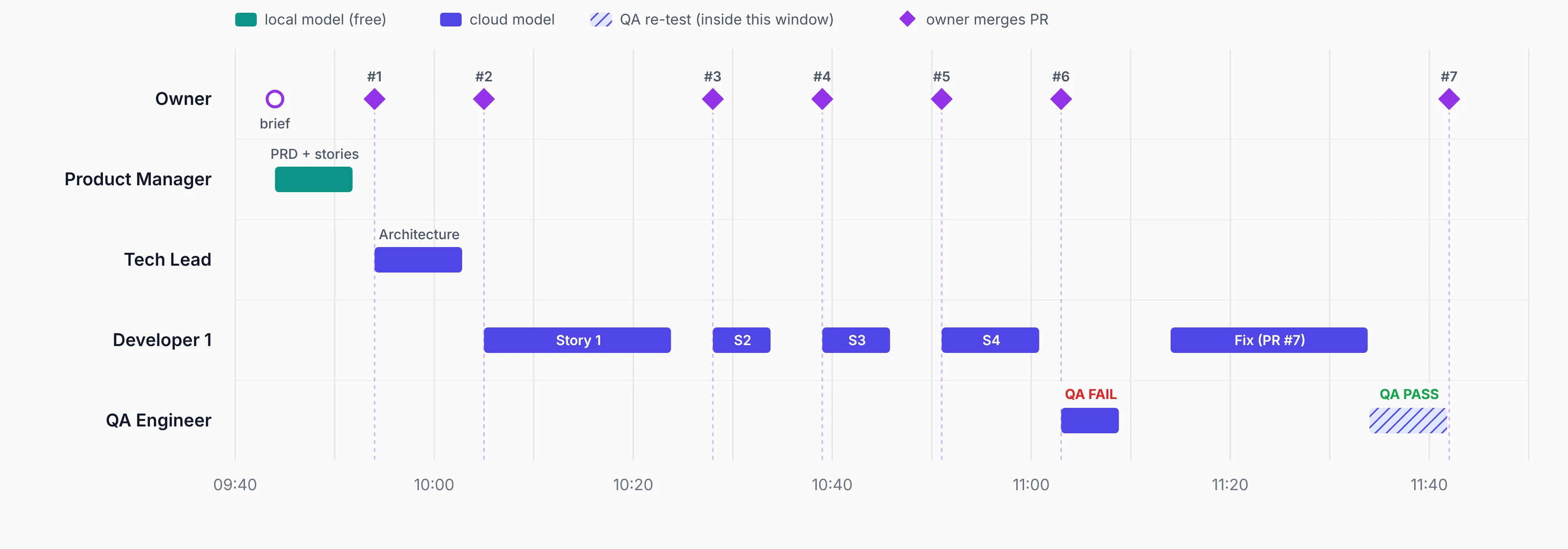
| Time | Who | What happened | PR |
|---|---|---|---|
| 09:44 | Owner | Creates the repository from the agency template and writes the brief | - |
| 09:52 | Product Manager | PRD + 4 stories delivered (8 min) | #1 opened |
| 09:54 | Owner | Reviews and merges the spec | #1 merged |
| 09:54–10:03 | Autopilot → Tech Lead | Autopilot creates the [ARCH] ticket; the Tech Lead writes the architecture, 4 decision records and 5 tickets |
#2 opened |
| 10:05 | Owner | Merges the architecture | #2 merged |
| 10:05–10:24 | Autopilot → Developer | Story 1 starts automatically: add and edit leads | #3 opened |
| 10:28 | Owner | Merges Story 1 | #3 merged |
| 10:34 | Developer | Story 2: pipeline board | #4 opened |
| 10:39 | Owner | Merges Story 2 | #4 merged |
| 10:46 | Developer | Story 3: list, search and filter | #5 opened |
| 10:51 | Owner | Merges Story 3 | #5 merged |
| 10:59–11:01 | Developer | Story 4: detail page, activity log, dashboard, delete, CSV (+ a lint fix) | #6 opened |
| 11:03 | Owner | Merges Story 4 | #6 merged |
| ~11:09 | QA Engineer | QA FAIL: make ci passed, but 4 of 8 browser tests failed. The ticket goes back to the developer. |
- |
| 11:14–11:34 | Developer | Investigates, fixes the test setup, adds the missing browser tests | #7 opened |
| 11:42 | Owner | Merges the fix. App complete. | #7 merged |
What each agent produced
- Product Manager (8 minutes, local model): a PRD with 7 feature requirements, non-functional requirements, open questions and a "confirm with the Board" list, plus 4 user stories. Story 1 alone had 14 Given/When/Then criteria and 9 test notes. A real example: "Given Estimated value set to 1250.123 (3 decimal places), When the user clicks Save, Then the Save button is disabled and an inline error message 'Value must have at most 2 decimal places' is displayed."
- Tech Lead (about 10 minutes): an architecture document, 4 decision records (a static, client-only app; one versioned storage module that is the only code allowed to touch browser storage; local calendar dates, never UTC; pure logic in
lib/with display-only components), plus 4 chained build tickets and 1 QA ticket. The PRD had suggested Tailwind and Jest. The Tech Lead chose plain CSS and Vitest, within the agency's default stack. The PRD's tech section is a suggestion; the architecture decides. - Developer: about 1,000 lines of TypeScript including tests, and 37 automated tests across 7 files (unit, component and Playwright browser tests), in 6–20 minutes per story. It also added two small but smart details from the architecture: CSV cells that start with
=,+,-or@get an apostrophe so a spreadsheet won't run them as formulas, and open tabs stay in sync through storage events.
Totals: about 2 hours from an empty repository to a finished app, including all my reviews. 7 pull requests, all reviewed and merged by me, at about 2–5 minutes of review each, with Claude Code as an AI second reviewer.
14. QA said no
This is the part of the run that convinced me the setup works.
After Story 4 merged, the developer considered the app done, and the QA ticket started automatically. The QA agent ran everything. The unit tests and the build passed. The browser tests failed 4 of 8. It reported that a lead's stage didn't seem to stay saved after a page reload, that some list-view tests couldn't find the right elements, and that the branch had no pull request link yet. It wrote the exact steps to reproduce and the changes needed, and handed the same ticket back to the developer.
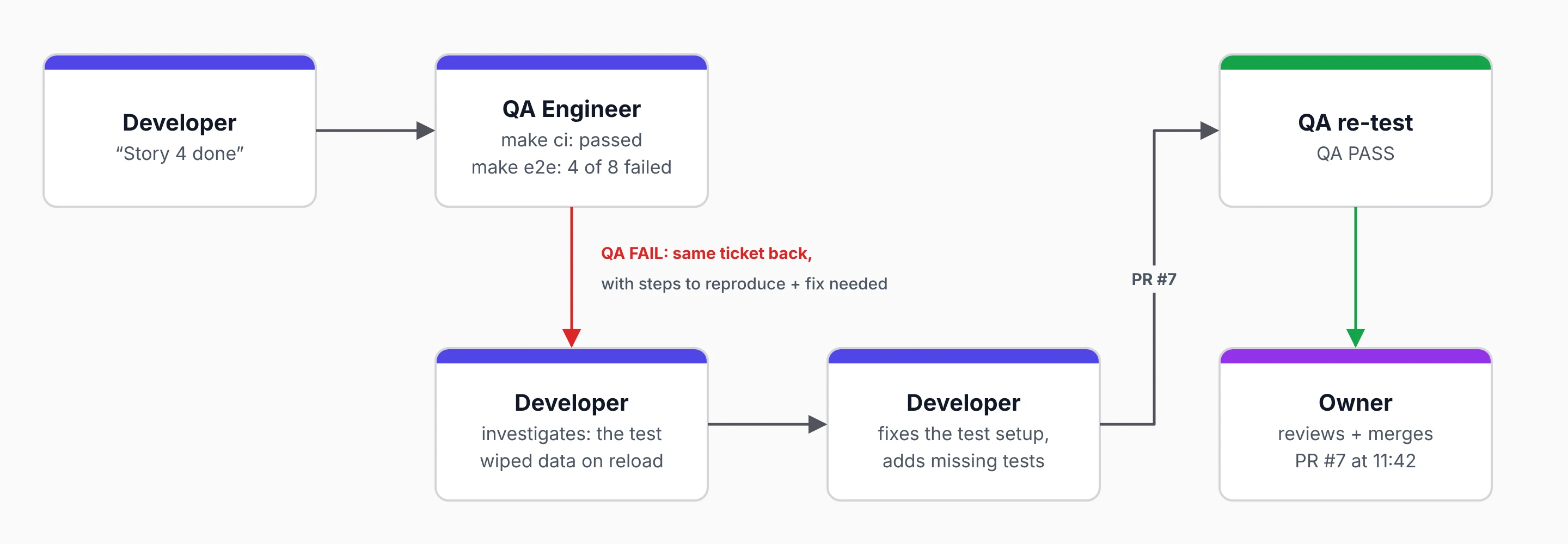
The developer investigated and found that the app was saving correctly. The real bug was in the test setup: it wiped the saved data on every page reload, so that test could never pass. In its own words, it would make the test "reload-safe… rather than masking any behavior". It fixed the setup, tightened the brittle checks, added the missing edge-case tests and opened PR #7. QA re-tested and said QA PASS, and I merged it at 11:42.
Three things are worth pointing out:
- The agents check each other's work, and a failure loops back on its own. I didn't have to step in.
- The rule "a line you did not try is a FAIL" is what stops an agent from declaring victory early.
- The developer fixed the real cause instead of deleting or weakening the test, which the rules forbid.
15. What it costs
I measured usage with Paperclip's cost report for the day, taken while the build was running (before the final fix finished). Prices are OpenAI's API list prices after the 30 July 2026 price cut, per million tokens: GPT-5.6 Terra $2 input and $12 output, with cached input assumed at $0.20; GPT-5.6 Luna $0.20 input, $0.02 cached and $1.20 output.
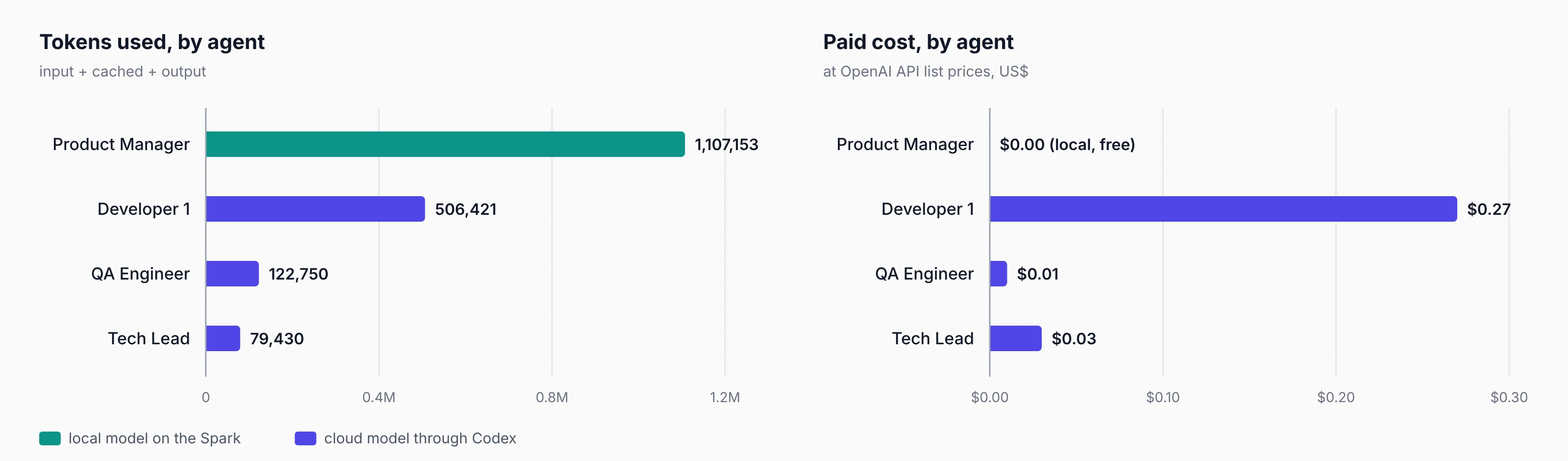
| Agent | Model | Input tokens | Cached tokens | Output tokens | Cost at API prices |
|---|---|---|---|---|---|
| Developer 1 | GPT-5.6 Terra | 76,656 | 426,752 | 3,013 | $0.27 |
| Tech Lead | GPT-5.6 Terra | 1,229 | 77,568 | 633 | $0.03 |
| QA Engineer | GPT-5.6 Luna | 9,898 | 110,976 | 1,876 | $0.01 |
| Product Manager | Qwen 3.6 (local) | 1,093,650 | 0 | 13,503 | $0.00 |
The honest summary is under one dollar of paid AI usage at API prices. Paperclip is known to under-count Codex usage, by up to about 2x, so a fair range is $0.30–$0.70. In practice I pay through a ChatGPT subscription with Codex limits, not per token; API prices are just a fair way to compare. The local model has no per-use cost, but the hardware and electricity aren't in this number.
The biggest saving was running planning locally. The Product Manager used the most tokens of any agent, about 1.1 million, because it re-reads the plan on every step. On GPT-5.6 Terra that would have cost about $2.35. On the local model it cost $0. That cut the paid cost of this project by roughly 8x.
Caching helps too. When an agent re-reads the same files and rules, the provider re-uses its earlier work and charges about 10x less. The developer had about 427,000 cached tokens against 77,000 fresh ones.
16. Mistakes that shaped the design
Most of the rules above exist because something went wrong first.
| Problem | What I changed |
|---|---|
| Agents couldn't push to GitHub ("could not read Username"). Each run gets a temporary home folder, so it never saw the machine's GitHub login. | The GitHub login helper is set inside each project's own git settings, and Autopilot keeps it set. Leads Tracker was the first project where every push worked on its own. |
| Waiting for clicks. After a merge, the next step often didn't start until someone moved the ticket. | Autopilot: a no-AI script that runs every minute, does those moves and comments on each ticket. |
| QA said "PASS" too easily on an earlier project. | Strict QA rules: browser tests with proof, every test note tried, phone and laptop widths, bad input, reloads. "A line you did not try is a FAIL." This time QA caught real failing tests. |
| The local model as a code reviewer. On a pull request with two known bugs, it said "no problems found" twice. | The local model is great for planning, but code review stays with a stronger AI and the human. Use each model where it's strong. |
| Token counts looked too low. The built-in report under-counted Codex usage (on one project, about half the real output). | I check the provider's usage page before and after a project for the real number. |
| Agents invented their own git names. | The bot name is set once for the whole machine, and agents are told never to change it. |
| Too many agents cost more for no gain. | Run lean: 4 active agents; the CEO, second developer, tech writer and DevOps agents stay paused until they're needed. |
| Vague briefs led to fix rounds. | Exact briefs with real colours, text, currency, limits and a "Done when" list. |
| Big projects in one go are risky. | Build in phases of up to 4 stories, review every PR before merging, and start after the usage limit resets. |
The same team had built smaller projects before this one: a first FastAPI health endpoint, an invoice maker (where review found 9 fixes, each then checked in a real browser) and a price calculator (5 pull requests merged in about an hour, with QA passing on the cheapest model).
17. If you want to build your own
The specific tools will change. These are the decisions I'd keep:
- Copy the shape of a human team. Separate roles with separate outputs (spec, architecture, story PRs, QA report) give you review points and a paper trail.
- Keep a human on the merge button. Agents propose, a person decides. Branch protection makes that a hard rule, not a habit.
- Give agents one way to do things. A shared template with a
Makefile, CI, a pre-push hook and anAGENTS.mdmeans every project looks the same and every agent runs the same checks. - Make QA adversarial and evidence-based. Real browser, two screen sizes, every test note, pasted proof, and "not tried = FAIL".
- Match models to jobs. Run high-volume reading (planning) on a local model, and pay for strong reasoning only where it shows up in the code.
- Automate the clicks with plain code. Use AI where judgment is needed and a script where the rule is mechanical.
- Write briefs QA can test. The "Done when" list is the cheapest quality tool in the whole system.
- Start lean. One developer, small phases, and add agents only when the work needs them.
18. Why the human stays in charge
It would be easy to pitch this as "fully autonomous". It isn't, and I don't want it to be. In the run above, the agents did the planning, design, coding, testing and even their own fix loop. But every one of the 7 changes went in because a person read it and clicked merge, and every merge left a record of who wrote what.
That's what makes the speed and the cost useful. A two-hour, sub-dollar build is only worth having if you can trust what came out, and the trust comes from the structure: specs, tests first, green checks, a QA agent that's allowed to say no, and a human who signs off.
Want something like this built for your business, or help setting up an agent team of your own? Get in touch.